


GroupMe
4.6165.40K Reviews
App Specs
- Version
- 15.91.1
- Updated On
- License
- Free
- Downloads
- 10,000,000+
- Developer
- GroupMe
- Categories
- Communication
- Platform
- Android, iOS
Screenshots




 Analysis by AppCompare
I judge a group chat app less by how many things it can do than by whether it helps a conversation stay useful once the messages start piling up. That is the part of GroupMe I find most appealing: it gives people a shared place to talk, plan, and find details again without making the setup feel like a project. It is a free communication app from GroupMe, and I can see why it has become a familiar option for friends, families, clubs, and teams that need a simple group space.
One shared space for people who do not all use the same tools
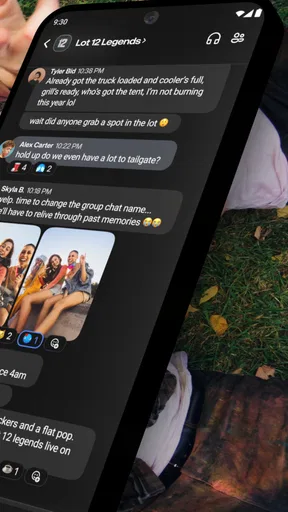
The central idea is straightforward: make a group, bring people into it, and keep the conversation in one thread. In practice, that can be more useful than it sounds. A family may already be scattered across different phones and messaging habits, while a volunteer team may include people who only need to check in occasionally. A shared group gives everyone a common place to see the plan instead of relying on one person to forward messages between separate chats.
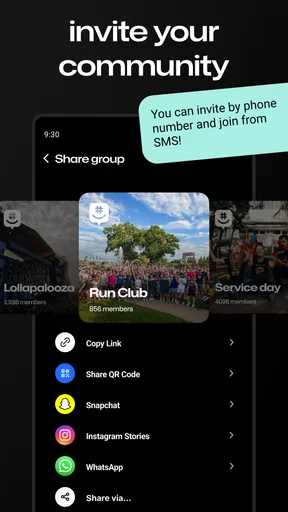
One detail I especially like is the option to invite people with a link, including people who do not have the app. That lowers the barrier when I am organizing something with a mixed crowd. I would still tell people to install it if they expect to participate often, but a link makes it easier to get a one-off group moving without first persuading every guest to adopt another app.
The app’s long history is reflected in its broad familiarity: it was released in 2010, and it now has over 10 million installs. Its average rating is 4.6 from around 604,000 ratings, with roughly 164,000 written reviews. Those figures do not tell me whether every group will enjoy using it, but they do suggest that it is a well-established choice rather than a new, untested chat tool.
Setting Up Your GroupMe Experience
Getting started with GroupMe is a breeze. After downloading the app from your favorite app store, you can sign up with your email or phone number. I personally love that they keep it simple, no unnecessary hoops to jump through. Once you're in, you can start creating groups for just about anything: family, friends, work teams, you name it.
One of the standout features is how easy it is to add people to your groups. You can invite folks via a link, and they can join even if they don’t have the app. It’s perfect for those times when you’re organizing a get-together and don’t want to hassle everyone with app downloads.
Chatting Like a Pro
Now, let’s talk about the chatting experience. The interface is pretty straightforward, which I appreciate. You can send texts, of course, but also images, gifs, and even videos. There's a nifty feature where you can "like" messages, which adds a bit of fun and keeps the conversation flowing.
Worth Reading Before You Choose

EA SPORTS FC Mobile 26 Is a Bigger Football Game, but It Takes Time

Flipboard Shows What News Apps Must Do Beyond the Feed

Switching to Android Auto Means Rethinking Your Driving Routine

Google Calendar Makes a Crowded Week Easier to Manage

Ludo King Makes the Most of the Minutes Between Plans

Baby Panda World Brings Quick Play to Modern Phones, but Its Game Library Feels Busy
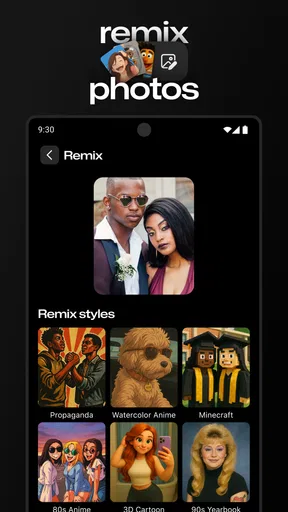
And for those of us who love a good emoji, the app doesn’t disappoint. It’s packed with all the expressive characters you could want. Plus, you can create your own memes directly in the app! I had a blast making my own memes and sharing them with friends. It's these little touches that make conversations feel more lively and personal.
Keeping It Organized
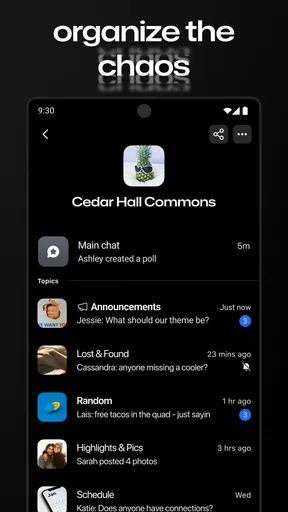
What really makes GroupMe shine is its organizational capabilities. You can pin important messages to the top of the chat for easy reference, which is a lifesaver for those long, busy threads. Plus, the search function is robust, so you can easily find past messages without endless scrolling.
Notifications are customizable too. You can mute groups that are less urgent and set alerts for the ones that need your immediate attention. I find this feature incredibly useful to avoid being overwhelmed by constant pinging.
Extra Features Worth Mentioning
There’s more to GroupMe than just messaging. You can also create events and polls, which are excellent for planning anything from a dinner party to a weekend getaway. The calendar integration is smooth, so you never miss out on any plans.
And if you're like me and sometimes prefer a desktop experience, you'll be happy to know there's a web version too. It syncs perfectly with the app, so you can switch from phone to computer without missing a beat.
Where it fits—and where it does not
I would use this most for a group that needs coordination but does not need a formal project-management system. Picture a few friends arranging a weekend meal: someone shares possible dates, another posts a photo of a menu, and the group uses a poll to narrow down the choice. Once the time is settled, an event gives people a shared reference point. That is a practical workflow because the conversation and the decision-making stay together.
For recurring groups, I would make a habit of pinning only the details that will matter later, such as the current meeting place or an important instruction. If every passing thought gets pinned, the shortcut loses its value. Search is better for retrieving something that was useful once but is no longer the group’s current priority. This small distinction helps keep a busy chat from turning into a jumble of old announcements.
GroupMe is also a reasonable fit for an informal team that wants quick updates without asking everyone to learn a complicated collaboration suite. But I would not treat a chat thread as a substitute for a carefully maintained task tracker. If assignments, deadlines, and ownership need to remain visible over time, a dedicated work tool is likely clearer. Group messaging is strongest when people need to talk and make lightweight plans; it becomes less dependable as the only record of complex work.
Everyday trade-offs before you invite everyone
The same open, easygoing conversation that makes a group inviting can also create noise. I would mute a social group during work or study hours rather than leave it and miss the occasional message I care about. For a group that needs prompt responses, I would keep alerts on and agree with members about what deserves an urgent message. The app can help manage notifications, but the group still needs sensible habits.
Another useful practice is to put the decision in plain words after a poll or a long discussion. A poll can help people choose, but the final message should say what the group settled on, especially if some members check in late. Likewise, event details work best when the chat includes a clear plan rather than expecting everyone to reconstruct it from scattered replies. These habits are not extra app features; they are ways to get more value from a shared thread.
Compared with ordinary one-to-one messaging apps, GroupMe makes the group itself the focus, which is helpful when a plan involves many people. Compared with larger community platforms, it feels better suited to a defined circle that wants direct conversation than to a public-facing space with elaborate channels and administration. If everyone already uses another messenger and the group is small, switching may add friction without solving a real problem. I would choose the tool the group will actually open, not the one with the longest feature list.
Some people will also prefer a different option if they need a work chat with more structured channels, or if they want a private conversation rather than a shared group. GroupMe’s appeal is its accessible, casual style, not replacing every kind of communication. It is rated Teen, so I would keep that audience context in mind when deciding whether it suits a younger group and what kind of conversations belong there.
Who will get the most from it
I would recommend trying it if you regularly coordinate friends, family, a club, or a local team and want one place for messages, images, polls, and event planning. It is particularly useful when not everyone is already committed to the same app, because the invitation link can make joining less of a hurdle. Someone who mainly wants private one-to-one chats, strict project tracking, or a quiet inbox may be happier with a different setup.
The app is free, and the current version is 15.25.4, with support for iOS 9 and later. Those details make it easier to judge whether it is a practical option for your device, but I would still make the decision around the group’s habits: a chat tool only helps if members are willing to check it and keep important plans clear.
In conclusion, if you're looking for a reliable, feature-rich group messaging app, GroupMe is definitely worth checking out. It's user-friendly, packed with useful features, and makes group communication a breeze. Whether you're organizing a big event or just want a central place to chat with your friends, this app has got you covered.
Pros
- User-friendly interface
- easy navigation.
- Supports group chats with unlimited members.
- Free to use with no in-app purchases.
- Available on multiple platforms
- including web.
- Customizable notifications for each chat.
Cons
- Limited media sharing options.
- No video calling feature available.
- Message search could be improved.
- Occasional notification delays.
- Lacks advanced privacy settings.
FAQs for GroupMe
What is GroupMe and how does it work?
GroupMe is a free messaging app that allows users to create groups for easy communication. You can send texts, photos, and videos within groups or in direct messages. It's available on both Android and iOS, and offers unique features like event creation and meme generators, making it ideal for both personal and professional use.
Do I need to create an account to use GroupMe?
Yes, you need to create an account to use GroupMe. You can sign up using your email address or phone number. Once registered, you can easily create or join groups, and start chatting with friends, family, or colleagues. The registration process is straightforward and quick, ensuring you’re connected in no time.
Is GroupMe free to use, and are there any hidden costs?
GroupMe is completely free to use. There are no hidden fees or subscription costs. The app is supported by ads, but they are typically unobtrusive. Users can enjoy messaging, sharing media, and using all features without any financial commitment, making it accessible for everyone.
How secure is GroupMe in terms of privacy and data protection?
GroupMe employs standard encryption protocols to protect your messages, but it does not offer end-to-end encryption. While your data is generally safe, it's important to be cautious with the information you share. The app also allows you to block users and manage group privacy settings to control who can join your conversations.
Can I use GroupMe on different devices and sync my chats?
Yes, GroupMe supports multi-device use. You can access your account and chats from smartphones, tablets, and desktops. All messages and media are synced across devices, ensuring a seamless experience. This feature is especially useful for users who switch between devices frequently throughout their day.


